
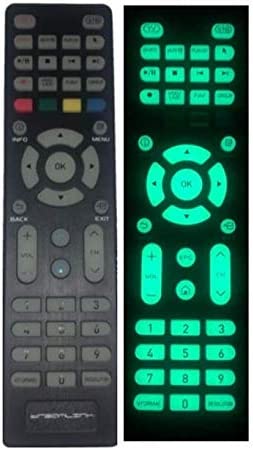
Formuler GTV luminous Remote
GTV-BT1 FORMULER remote
Version of firmware: 0.5.3d
Version 1.2.5 of the app
Integrated Volume Control is now available on the Formuler BT1 Remote.
For the Formuler BT1 premium remotes, the much-desired Integrated Volume Control feature is now available. With the BT1 remote, you can now adjust the volume of external audio equipment including TVs, AVRs, and Soundbars without switching the BT1's mode.
Download and install the Formuler Remote software version 1.2.5 to
your Formuler device, then upgrade your BT1 firmware to version 0.5.3d to enable this new feature. By using the Formuler Remote app's new "Setup Volume Control" menu, you can modify how the BT1's volume buttons behave.
Additionally, scrolling may now be controlled in apps for mobile devices using the Info/Guide and Ch/Pg buttons for up and down, respectively. After you set the mouse to a hotkey, it is only accessible in mouse cursor mode.
How to set up:
Regarding Z8/Z10-series gadgets:
- Open the Market app.
- Update/Install Formuler Remote v1.2.5
- Go to step "A" below.
To GTV:
- Launch the Google Play Store.
- Check for updates to the Formuler Remote app.
- Go to step "A" below.
Install the BT1 firmware 0.5.3d after updating the Formula Remote app:
- Launch the Formula Remote app.
- On the RCU selection screen, select GTV-BT1.
- At the menu, choose RCU Update App from the bottom.
- Update the BT1's firmware to version 0.5.3d
Notes on Release:
Models that apply: Formular GTV-BT1 Remote Control
Version of the Formular Remote app: 1.2.5
BT1 Firmware: 0.5.3d
Use and install at your own risk. Once installed, software cannot be rolled back.
Updates, fixes, and improvements
Change Record
- NEW: [BT1] Modify Volume button functionality to operate other devices when in STB mode. Version 0.5.3d or higher of the BT1 firmware is required.
- NEW: [BT1] Information/Guide for right and left, and Ch/Pg for up and down, are used as the scroll controls in mobile apps. readily accessible in mouse pointer mode
- IMP: [BT1] Complete IR code list has been included for increased remote compatibility.
- Bug fixes, performance improvements, and optimizations
If you purchase Formuler products from our website, you will receive a free gift. Hurry up
TO BUY
FORMULER GIFTS:
1. T 16 Wireless Touchpad Mini Keyboard
2. Air mouse & keyboard
3. Luminous Remote
4. 3 IN one USB phone charger
5. Antibacterial Washable Face mask
6. Z-Slot USP Port Extender

Related Products


Comment(s)
Recent Posts




