

Formuler Z10 Remote Control

The Formuler Z10 remote control is a cutting-edge device that offers users an intuitive and seamless experience in controlling their Formuler Z10 devices. Designed with ergonomic precision and packed with advanced features, this remote control is the perfect companion for navigating through your favorite entertainment content. In this article, we will explore the features, functionality, setup process, and tips for using the Formuler Z10 remote control, ensuring that you make the most of this powerful accessory.
1. Formuler Z10 Remote Control
The Formuler Z10 remote control is specifically designed to complement the Formuler Z10 media streaming device. It provides a simple and efficient way to navigate through the device's user interface, access apps, browse content libraries, and control various settings. The remote control enhances the overall user experience by offering seamless control options, ergonomic design, and advanced functionalities that make it a standout device in the market.
2. Features and Functionality of the Formuler Z10 Remote Control
2.1. Ergonomic Design and Button Layout
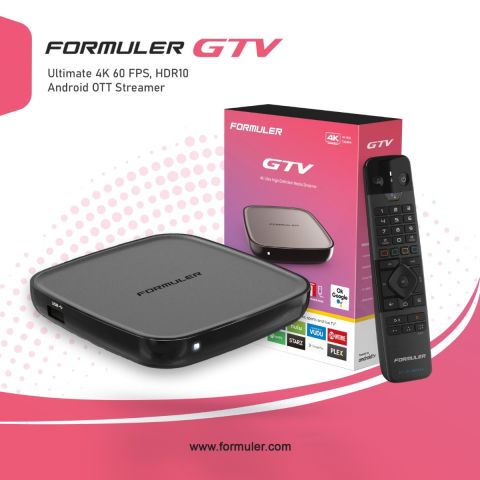
The Formuler Z10 remote control boasts a sleek and ergonomic design, ensuring a comfortable grip and effortless operation. Its compact size fits perfectly in your hand, allowing for extended use without any discomfort. The well-placed buttons and intuitive layout make it easy to navigate through menus, adjust settings, and control playback.
2.2. Advanced Navigation and Control Options
With the Formuler Z10 remote control, you have a range of advanced navigation and control options at your fingertips. The intuitive directional pad allows for smooth and precise navigation, ensuring seamless browsing through menus and content libraries. The dedicated playback buttons enable convenient control over play, pause, rewind, and fast-forward functions, enhancing your media consumption experience.
2.3. Voice Control Capabilities
One of the standout features of the Formuler Z10 remote control is its voice control capabilities. Integrated with advanced voice recognition technology, the remote control allows you to search for content, launch apps, and control various functions using simple voice commands. This hands-free operation adds a new level of convenience and accessibility to your entertainment experience.
2.4. Programmable and Customizable Functions
The Formuler Z10 remote control is designed to adapt to your preferences and needs. It offers programmable buttons that can be customized to perform specific actions or launch frequently used apps with a single press. This personalization feature ensures that you have quick access to your favorite functions and simplifies your interaction with the device.
2.5. Compatibility with Formuler Z10 Devices
The Formuler Z10 remote control is specifically designed for seamless compatibility with Formuler Z10 devices. It uses advanced wireless technology to establish a stable connection with the media streaming device, ensuring responsive and reliable control. This compatibility ensures that you can fully utilize the remote control's features and experience a smooth and hassle-free entertainment experience.
3. Setting up the Formuler Z10 Remote Control
To make the most of your Formuler Z10 remote control, it is essential to go through a simple setup process.
3.1. Pairing the Remote Control with the Device
The first step is to pair the remote control with your Formuler Z10 device. To do this, ensure that both the remote control and the device are powered on and in close proximity. On your Formuler Z10 device, navigate to the settings menu and find the "Remote Control" or "Accessories" section. Follow the on-screen instructions to establish a connection between the two devices. Once paired, the remote control will be ready to use.
3.2. Configuring the Remote Control Settings
After pairing, you can customize the remote control settings according to your preferences. Access the remote control settings menu on your Formuler Z10 device and explore the available options. You can configure the button assignments, adjust the sensitivity of the touchpad (if applicable), and enable or disable specific functions based on your usage habits. Experiment with the settings to find the optimal configuration that suits your needs.
4. Tips and Tricks for Using the Formuler Z10 Remote Control
Now that you have set up your Formuler Z10 remote control let's explore some tips and tricks to enhance your experience:
4.1. Navigating the User Interface
The Formuler Z10 remote control offers various navigation options to streamline your interaction with the device. Utilize the directional pad to move through menus and lists effortlessly. Use the touchpad (if available) for smooth cursor movement and precise selection. Familiarize yourself with the navigation shortcuts, such as long-pressing the home button to access recent apps, to speed up your browsing experience.
4.2. Using Shortcut Buttons for Quick Access
Take advantage of the shortcut buttons on the Formuler Z10 remote control to quickly access frequently used functions or apps. These buttons can be customized to suit your preferences. Assign shortcuts to popular streaming services, favorite apps, or specific settings to save time and streamline your entertainment experience.
4.3. Customizing the Remote Control Functions
Make the remote control truly your own by customizing its functions. Program the buttons to perform specific actions or assign them to launch your preferred apps. Explore the remote control settings menu on your Formuler Z10 device to unlock the full potential of customization. By tailoring the remote control to your needs, you can simplify complex operations and streamline your media consumption.
5. Troubleshooting Common Issues with the Formuler Z10 Remote Control
Despite its advanced features, you may encounter some issues with the Formuler Z10 remote control.
5.1. Remote Control Not Responding
If the remote control is unresponsive, first ensure that the batteries are properly inserted and have sufficient charge. If the issue persists, try re-pairing the remote control with the Formuler Z10 device. Navigate to the remote control settings menu on the device and follow the instructions for re-pairing. If the problem still persists, consider replacing the batteries or contacting Formuler customer support for further assistance.
5.2. Connectivity Issues
If you experience connectivity issues between the remote control and the Formuler Z10 device, check for any obstacles or interference that may disrupt the wireless signal. Ensure that the remote control and the device are within a reasonable range of each other. Additionally, try resetting the remote control by removing and reinserting the batteries. If the problem persists, consider troubleshooting the Formuler Z10 device or contacting customer support.
5.3. Battery Life and Replacement
To ensure optimal performance, regularly check the battery level of the Formuler Z10 remote control. If you notice decreased battery life, replace the batteries with fresh ones. Use high-quality batteries for extended usage and longevity. It is also advisable to keep spare batteries on hand to avoid any interruptions in control.
The Formuler Z10 remote control is a powerful and feature-rich accessory that enhances your control over the Formuler Z10 media streaming device. Its ergonomic design, advanced navigation options, voice control capabilities, and customizable functions make it a standout choice for users seeking a seamless and personalized entertainment experience. By following the setup process, exploring the tips and tricks, and troubleshooting common issues, you can unlock the full potential of the Formuler Z10 remote control and elevate your media consumption to new heights.
FAQs
Can I use the Formuler Z10 remote control with other Formuler devices?
Yes, the Formuler Z10 remote control is compatible with other Formuler devices, ensuring a consistent and intuitive control experience.
Yes, the Formuler Z10 remote control is compatible with other Formuler devices, ensuring a consistent and intuitive control experience.
Is the Formuler Z10 remote control compatible with third-party apps?
Yes, the remote control can be used to navigate and control third-party apps installed on your Formuler Z10 device.
Does the Formuler Z10 remote control require an internet connection?
No, the remote control operates via a wireless connection with the Formuler Z10 device and does not require a separate internet connection.
Can I use voice control for searching and playing specific content?
Yes, the Formuler Z10 remote control supports voice control, allowing you to search for content, launch apps, and control playback using voice commands.
How long do the batteries in the Formuler Z10 remote control last?
The battery life of the remote control depends on usage. With regular use, the batteries can last several months before needing replacement.


Related Products
- Comment(s)




Recent Posts




