

Formuler CC Remote Control New
The Formuler CC remote control New is a compact and stylish device that allows you to control your Formuler CC streaming device. It is a voice remote control that supports Google Assistant and has a built-in microphone for voice commands.
The remote control features a circular directional pad that allows you to navigate through menus and select options. It also has dedicated buttons for home, back, and power, as well as volume and mute controls. The remote control also features a dedicated button for the Google Assistant, allowing you to use voice commands to search for content, control your smart home devices, and more.
In addition to the physical buttons, the Formuler CC remote control also has a touchpad that allows you to swipe and scroll through menus and content. The touchpad also supports gestures, such as double-tap to select, and pinch-to-zoom for easier navigation.
The Formuler CC remote control connects to the Formuler CC streaming device via Bluetooth, making it easy to use without having to point it directly at the device. It also has a built-in rechargeable battery that provides long-lasting performance, and can be charged using the included USB cable.
Overall, the Formuler CC remote control is a versatile and intuitive device that makes it easy to control your Formuler CC streaming device. Its voice control features and touchpad make it easy to use and navigate, providing you with a seamless streaming experience.
Software Programmable
Multiple programmable hotkeys put you in command of the user experience.
FAQ
What is the Formuler CC and what does it do?
The Formuler CC is a streaming device that allows you to access a variety of content from your TV, including live TV channels, movies, TV shows, and apps.
What are the technical specifications of the Formuler CC?
The Formuler CC features a quad-core processor, 2GB of RAM, 8GB of internal storage, Wi-Fi connectivity, HDMI output, and supports up to 4K Ultra HD resolution.
Can the Formuler CC connect to the internet?
Yes, the Formuler CC can connect to the internet via Wi-Fi or Ethernet.
What kind of operating system does the Formuler CC use?
The Formuler CC uses the Android operating system.
How do I set up the Formuler CC?
To set up the Formuler CC, connect it to your TV via HDMI, connect it to the internet via Wi-Fi or Ethernet, and follow the on-screen instructions to complete the setup process.
What kind of apps can I download and use on the Formuler CC?
You can download and use a variety of apps on the Formuler CC, including streaming apps like Netflix and Hulu, as well as games and productivity apps.
How do I access and use the electronic program guide (EPG) on the Formuler CC?
To access the EPG on the Formuler CC, press the EPG button on your remote control. You can use the EPG to browse upcoming TV shows and schedule recordings.
Can I record TV shows or movies on the Formuler CC?
Yes, you can record TV shows or movies on the Formuler CC by connecting a USB storage device and using the built-in DVR functionality.
How much storage space does the Formuler CC have?
The Formuler CC comes with 8GB of internal storage.
Does the Formuler CC support external storage devices?
Yes, the Formuler CC supports external storage devices via USB.
Love what you see? Why wait? Hurry!
You will get a 10 % discount and a free gifts ✨ If you buy a Formuler product from our website. Hurry, this is a limited-offer.
SUPER SALE !!! SUPER OFFER!!! 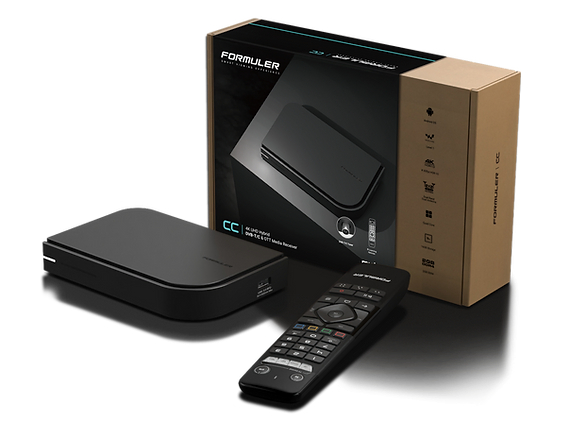

Related Products
- 0 Comment(s)




Recent Posts




