

Formuler Z10 Setup - Wireless, Ethernet and Android 2023

This powerful and versatile streaming device is packed with features that will take your entertainment experience to the next level. In this article, we'll guide you through the setup process for the Formuler Z10, covering wireless, Ethernet, and Android configurations. Whether you prefer a wireless connection for convenience, a wired Ethernet connection for stability, or want to explore the possibilities with the Android operating system, we've got you covered. So let's dive in and get your Formuler Z10 up and running smoothly!
Formuler Z10 Setup Overview
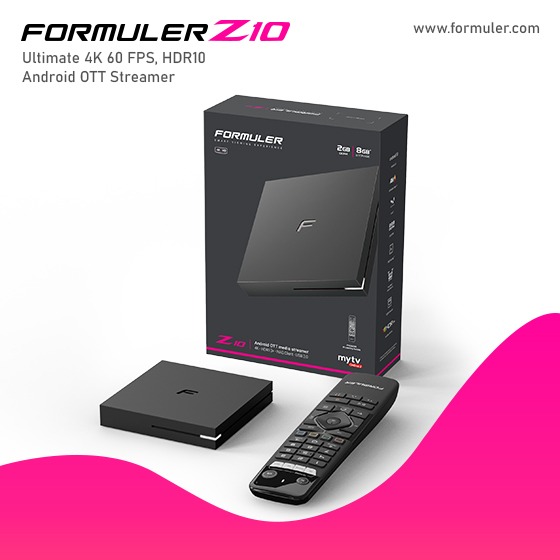
Before we delve into the specific setup instructions, let's first understand the Formuler Z10 device and its capabilities. The Formuler Z10 is a premium IPTV and Android streaming box that allows you to access a wide range of content, including live TV, movies, shows, and apps. It offers a user-friendly interface, powerful hardware, and advanced features such as 4K resolution support and built-in recording capabilities. Now, let's move on to the setup process.
1. Wireless Setup:
Setting up a wireless connection for your Formuler Z10 is a breeze. With its built-in Wi-Fi capabilities, you can easily connect to your home network and enjoy seamless streaming without the hassle of wires. Here's how to do it:Step 1: Power on your Formuler Z10 and navigate to the settings menu.
Step 2: Select the "Network" option and choose "Wi-Fi" from the available options.
Step 3: Scan for nearby Wi-Fi networks and select your desired network from the list.
Step 4: Enter the Wi-Fi password if required and wait for the connection to establish.
Step 5: Once connected, you're all set to start streaming wirelessly on your Formuler Z10.
2. Ethernet Setup:
If you prefer a more stable and reliable connection, setting up your Formuler Z10 with an Ethernet cable is the way to go. Here's how you can do it:
Step 1: Connect one end of an Ethernet cable to your Formuler Z10 and the other end to your router or modem.
Step 2: Power on your Formuler Z10 and navigate to the settings menu.
Step 3: Select the "Network" option and choose "Ethernet" from the available options.
Step 4: Your Formuler Z10 will automatically detect the Ethernet connection and establish a network connection.
Step 5: Once connected, you're ready to enjoy uninterrupted streaming on your Formuler Z10.
3. Android Setup:
The Formuler Z10 runs on the Android operating system, which opens up a world of possibilities for customization and app compatibility. Here's how you can set up the Android configuration on your Formuler Z10:
Step 1: Power on your Formuler Z10 and navigate to the settings menu.
Step 2: Select the "Device Preferences" option and choose "About" from the list.
Step 3: Scroll down and locate the "Build" or "Build Number" option.
Step 4: Tap on the "Build" or "Build Number" option multiple times until you see a notification saying "You are now a developer!"
Step 5: Go back to the settings menu and select the newly unlocked "Developer Options" menu.
Step 6: Enable the desired developer options, such as USB debugging or app installation from unknown sources.
Step 7: You're now ready to explore the full potential of the Android ecosystem on your Formuler Z10.
Formuler Z10 for wireless, Ethernet, and Android configurations is a straightforward process. By following the step-by-step instructions provided in this article, you'll have your Formuler Z10 up and running in no time. Whether you choose the convenience of a wireless connection, the stability of an Ethernet connection, or want to explore the vast world of Android apps, the Formuler Z10 has you covered. Enjoy seamless streaming, personalized customization, and endless entertainment possibilities with your Formuler Z10!
FAQs:
Can I use the Formuler Z10 with any TV?
Yes, the Formuler Z10 is compatible with most modern TVs that have HDMI input.Can I connect external storage devices to the Formuler Z10?
Absolutely! The Formuler Z10 supports USB storage devices, allowing you to expand its storage capacity.Does the Formuler Z10 require a subscription for streaming services?
Some streaming services may require a subscription, but the Formuler Z10 itself does not require any additional fees.Can I use a combination of wired and wireless connections?
Yes, you can use both Ethernet and Wi-Fi connections simultaneously on the Formuler Z10.Can I control the Formuler Z10 with my smartphone?
Yes, you can use the Formuler Remote+ app available for Android and iOS devices to control your Formuler Z10 wirelessly.
Related Products
- Comment(s)




Recent Posts




