
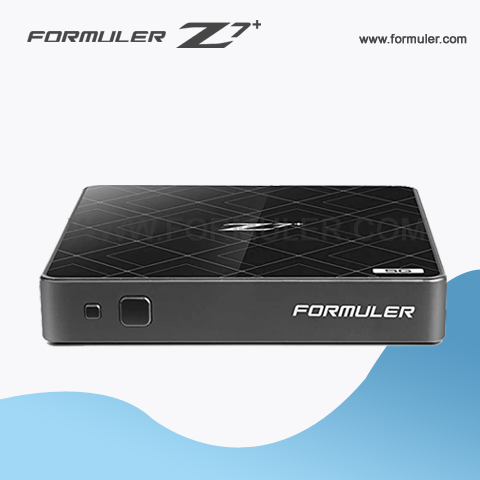
Formuler Z7 Plus Specifications

- Dimensions: 105mm x 105mm x 22mm
- Weight: 165g
- Processor: Hisilicon Quad-core 64-bit
- RAM: 2GB DDR4
- Storage: 8GB eMMC
Formuler Z7+ Dimensions
The Formuler Z7 Plus is a powerful IPTV set-top box that offers a wide range of features and capabilities for streaming and viewing digital content. Here are the dimensions of the Formuler Z7 Plus:
- Length: 105 mm (4.13 in)
- Width: 105 mm (4.13 in)
- Height: 22 mm (0.87 in)
The Formuler Z7 Plus is a compact and lightweight device that can be easily placed on a TV stand or mounted behind your TV. Despite its small size, the Formuler Z7 Plus offers powerful hardware and software that enables smooth and fast streaming of high-quality digital content.
In addition to its compact size, the Formuler Z7 Plus also offers a sleek and modern design that complements any home entertainment setup. With its high-quality construction and advanced features, the Formuler Z7 Plus is a top choice for anyone who wants to enjoy high-quality digital content on their TV.
Formuler Z7 Plus weight
The Formuler Z7 Plus is a compact and lightweight IPTV box that offers a variety of features for streaming live TV, video on demand, and other multimedia content. The weight of the Formuler Z7 Plus is approximately 150 grams, making it easy to carry and install.
Despite its small size and weight, the Formuler Z7 Plus is packed with powerful hardware and software that delivers smooth and reliable performance. The device features a quad-core processor, 2GB of RAM, and 8GB of internal storage, allowing you to run multiple apps and games seamlessly.
In terms of connectivity, the Formuler Z7 Plus offers a wide range of options, including Wi-Fi, Ethernet, HDMI, USB, and Bluetooth. It also supports 4K resolution and HDR content, providing a superior viewing experience.
Formuler Z7 Plus processor
The Formuler Z7 Plus is an advanced IPTV set-top box that features a powerful processor, which allows for high-quality streaming and fast navigation through menus and applications. The device is equipped with a quad-core processor and 2GB of RAM, providing smooth and seamless performance.
The processor used in the Formuler Z7 Plus is the Amlogic S905X, which is a high-performance chipset designed specifically for multimedia applications. This processor is capable of delivering fast and stable performance, even when running multiple applications simultaneously.
In addition to its powerful processor, the Formuler Z7 Plus also comes with a Mali-450 graphics processor, which ensures smooth and seamless playback of high-resolution video content. This GPU provides hardware acceleration for popular video codecs such as H.265, ensuring that you can enjoy high-quality video streams without any lag or stutter.
The Formuler Z7 Plus also comes with 8GB of built-in storage, which allows you to store your favorite applications and media files directly on the device. Additionally, the device supports external storage via a USB port, allowing you to expand its storage capacity even further.
Formuler Z7 Plus RAM
The Formuler Z7 Plus is an Android-based IPTV set-top box that is designed to provide users with an immersive TV viewing experience. The device is equipped with a range of features and specifications, including its RAM capacity. The Formuler Z7 Plus comes with 2GB of DDR4 RAM, which is sufficient for most IPTV applications and provides users with a smooth and seamless streaming experience.
RAM, or Random Access Memory, is a type of computer memory that allows data to be stored and accessed quickly. The more RAM a device has, the more data it can store and access at any given time, which can have a significant impact on the performance and speed of the device.
With 2GB of DDR4 RAM, the Formuler Z7 Plus can easily handle multitasking and provide a smooth and seamless streaming experience. This RAM capacity ensures that the device is capable of running multiple applications simultaneously without any lag or slowdowns. Users can switch between apps, browse the internet, and stream content without any interruptions or delays.
In addition to its RAM capacity, the Formuler Z7 Plus also comes equipped with a powerful processor, the Hisilicon Hi3798MV200, which is a quad-core ARM Cortex-A53 processor. This processor, combined with the 2GB of DDR4 RAM, ensures that the device is capable of delivering fast and responsive performance for all types of IPTV applications.
Formuler Z7 Plus Storage
The Formuler Z7 Plus is a popular IPTV set-top box that offers a range of features, including live TV streaming, video on demand, and access to various apps and services. To make the most of the device, you'll need to ensure that you have adequate storage space available. Here's what you need to know about storage on the Formuler Z7 Plus
Internal Storage:
The Formuler Z7 Plus comes with 8GB of internal storage, which is used to store the device's operating system, apps, and other system files. This storage is not user-expandable, so you'll need to be mindful of the space you're using and regularly clean up any unnecessary files.
External Storage:
To expand your storage capacity, you can use an external storage device such as a USB drive or a microSD card. The device supports external storage devices up to 2TB in size, giving you plenty of room to store your media files and other content.
Formatting External Storage:
When you connect an external storage device to the Formuler Z7 Plus, the device will prompt you to format it. Formatting will erase all data on the device and prepare it for use with the Formuler Z7 Plus. Once formatted, the device will be compatible with the Formuler Z7 Plus and you can start using it to store your media files.
Managing Storage:
To manage your storage on the Formuler Z7 Plus, you can access the Storage menu in the device's settings. Here, you can see how much storage space you have available, as well as how much space is being used by each app and file. From here, you can also clear app caches, delete unnecessary files, and manage your external storage devices.
Related Products
- Comment(s)




Recent Posts




