
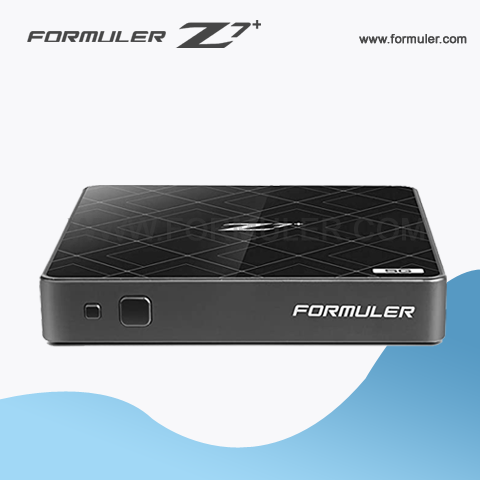
Formuler Z7+ Manual Instructions
Formuler Z7 Plus is an advanced IPTV set-top box that enables you to stream live TV channels, on-demand movies, TV shows, and much more. In this tutorial, we will guide you through the basic setup process and instructions for using your Formuler Z7 Plus.
Setting Up Your Formuler Z7 Plus
Step 1: Unbox Your Formuler Z7 Plus Unpack your Formuler Z7 Plus and check the contents of the box. You should have the Formuler Z7 Plus set-top box, a power adapter, a remote control, an HDMI cable, and a user manual.
Step 2: Connect the Formuler Z7 Plus to Your TV Connect one end of the HDMI cable to the Formuler Z7 Plus set-top box and the other end to your TV. Then, connect the power adapter to the Formuler Z7 Plus and plug it into a power outlet.
Step 3: Turn on Your Formuler Z7 Plus Press the power button on the Formuler Z7 Plus remote control to turn it on. You should see the Formuler logo on your TV screen, indicating that the set-top box is booting up.
Step 4: Connect to Your Wi-Fi Network Once the Formuler Z7 Plus has booted up, go to Settings > Network > Wi-Fi and select your Wi-Fi network. Enter your Wi-Fi password and click Connect.
Step 5: Update the Firmware After connecting to your Wi-Fi network, go to Settings > Device > Firmware Update and check for any available updates. If an update is available, follow the instructions to download and install it.
Using Your Formuler Z7 Plus
Step 1: Navigate the User Interface The user interface of the Formuler Z7 Plus is intuitive and easy to navigate. Use the arrow keys on the remote control to move around the screen and select items. Press the OK button to enter a selection.
Step 2: Access Live TV Channels To access live TV channels, go to the Live TV app on the home screen. You can scroll through the list of available channels and select one to start watching. You can also use the EPG (Electronic Program Guide) to see what's currently playing and what's coming up.
Step 3: Watch On-Demand Movies and TV Shows To watch on-demand movies and TV shows, go to the MyTVOnline app on the home screen. You can browse through the library of movies and TV shows and select one to start watching.
Step 4: Customize Your Settings You can customize your Formuler Z7 Plus settings to suit your preferences. Go to Settings and select the options you want to modify, such as Language, Display, and Audio.
Step 5: Use the Voice Control Feature The Formuler Z7 Plus also has a voice control feature that allows you to control it using voice commands. Press the microphone button on the remote control and speak your command, such as "Open Live TV" or "Search for Game of Thrones."
The Formuler Z7 Plus is a powerful set-top box that provides a seamless IPTV streaming experience. With this tutorial and these instructions, you should be able to set up and use your Formuler Z7 Plus with ease. Enjoy streaming your favorite TV channels, movies, and TV shows!
Related Products
- 0 Comment(s)




Recent Posts




